Cheque-printer hardware, software and appointment-based setup across the UAE Call +971 54 139 3050  ·  WhatsApp

Not ready to buy? Try our free cheque printing software for up to 15 entries before choosing a plan.

Configurable UAE Bank Templates

Cheque Printing Software UAE — Dubai, Abu Dhabi & All Emirates

Cheque writing software for UAE businesses with configurable bank templates, PDC tools, bulk printing and GCC currencies. Also searched as check printing software UAE. Complete package: AED 950, includes the software with 1 year support. UAE-wide service.

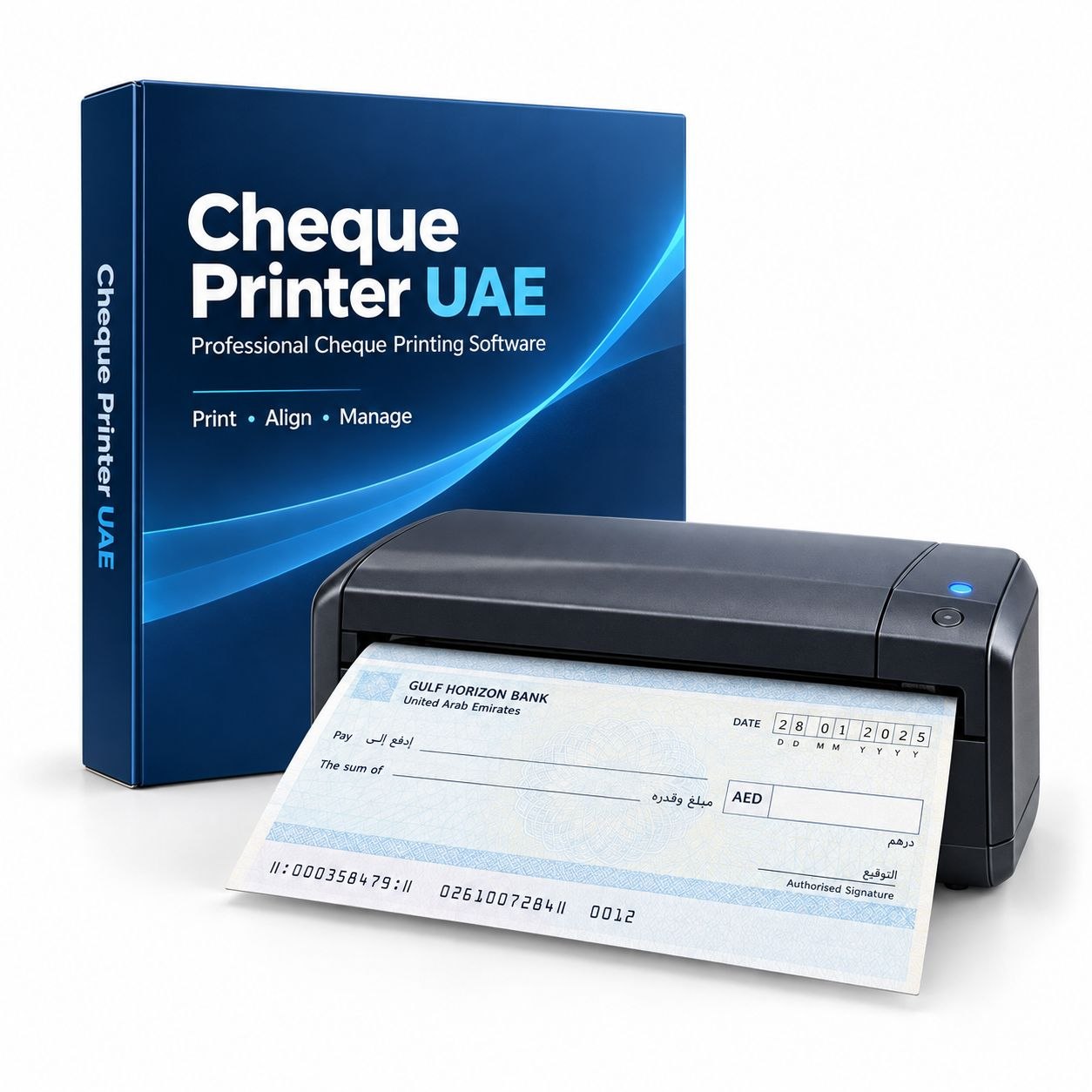
Cheque Printer UAE — professional cheque printing software box with compact cheque printer and UAE bank cheque
Complete cheque printing solution: software + printer for UAE businesses

Cheque Printing Software Pricing UAE

Free Trial

AED 0

15 cheques free • no card needed

  • ✓ Template for your confirmed cheque format
  • ✓ PDC management
  • ✓ Bulk cheque printing
  • ✓ Print 15 real cheques before you decide
  • ✓ No registration needed
Download Free Trial →
MOST POPULAR

Complete Package

AED 950

Printer + software + setup • includes the software with 1 year support

  • ✓ Full software licence — all features
  • ✓ Compact laser printer included
  • ✓ On-site installation at your office
  • ✓ Staff training included
  • ✓ Appointment-based delivery + setup
  • ✓ 1 year hardware warranty
Get Complete Package → See printer + software package details

Why Our Cheque Writing Software?

Built for everyday accounts work

🏦

Bank Templates Configured for Your Cheque

Create a bank and account profile, upload the cheque image, then align each printable field to the exact cheque format.

📅

PDC Management

Print batches of post-dated cheques for rent, instalments, or salary. Track status (cleared/pending/bounced). Bulk import from Excel. Reminders for upcoming PDCs.

💻

Windows Compatible

Designed for Windows 10 and Windows 11. Lightweight and suitable for ordinary office PCs and laptops. No high-end hardware is required.

🔁

Bulk Printing

Print dozens of cheques in one batch. Import payee list from Excel/CSV. Ideal for monthly salary, multiple vendor payments, or printing all PDC cheques at once.

🛠️

Remote Setup in 30 Min

Appointment-based remote or on-site setup includes installation, cheque alignment testing and user guidance.

🧾

Optional Payment Vouchers

Assign an A4 voucher profile to an account and optionally print a payment voucher alongside the cheque using a separate printer.

🌍

AED and GCC Currencies

Use AED by default or configure QAR, OMR, BHD, KWD and SAR wording for businesses operating across GCC markets.

Precise control without a complicated workflow

Configure each account once, then prepare cheques quickly

Every cheque book can differ by bank, account and issue. The software saves a separate account profile so the printing coordinates, wording, currency and printer choice can be reused without recalibrating every cheque.

Advanced calibration with live preview

Upload a clear cheque reference, set its dimensions and move the date, payee, words, figures, crossing and optional fields into position. Font size, bold styling, prefix and suffix text can be reviewed in the preview before a test print.

Control what prints on each cheque

Date, payee and amount fields can be enabled or disabled for an individual print. This is useful when a cheque will be dated later or when one field has already been completed separately.

PDC dates and spreadsheet batches

Choose practical post-dated shortcuts such as 30, 45, 60, 90 or 120 days, or select a custom date. For larger payment runs, import spreadsheet rows, validate names and numeric amounts, and review the batch before printing.

Local history and resilient access

Cheque records, profiles and backups remain on the user’s Windows computer. A paid licence is designed to remain usable through its purchased period even if the activation service is temporarily unavailable.

See the Cheque Printing Software

Real screens from the Windows application

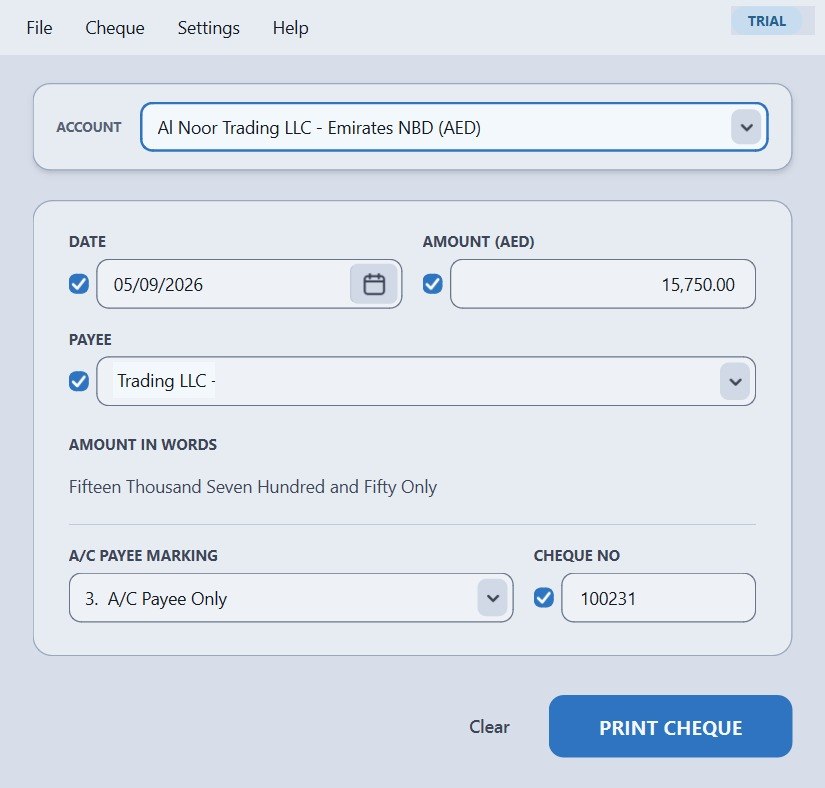
Single cheque entry and preview screen in ChequeprinterUAE
Single cheque
Choose the account and enter payee, date and amount.
Bulk cheque printing table with validated spreadsheet entries
Bulk preparation
Review spreadsheet rows before printing a cheque batch.
Local cheque history and payment status screen
Local history
Find previous cheques and keep an audit-friendly record.

UAE Banks — Cheque Formats We Configure

Every bank licensed by the UAE Central Bank, national and foreign — 60 in total. Find yours below.

Showing all 60 banks

UAE national banks (23)

  • 1Abu Dhabi Commercial Bank
  • 2Abu Dhabi Islamic Bank
  • 3Ajman Bank
  • 4Al Hilal Bank
  • 5Al Maryah Community Bank (Mbank)
  • 6Bank of Sharjah
  • 7Commercial Bank International
  • 8Commercial Bank of Dubai
  • 9Dubai Islamic Bank
  • 10Emirates Investment Bank
  • 11Emirates Islamic
  • 12Emirates NBD
  • 13First Abu Dhabi Bank
  • 14Invest Bank
  • 15Mashreq
  • 16National Bank of Fujairah
  • 17RAKBANK
  • 18National Bank of Umm Al-Qaiwain
  • 19Ruya Community Islamic Bank
  • 20Sharjah Islamic Bank
  • 21United Arab Bank
  • 22Wio Bank
  • 23Zand Bank

Foreign banks licensed in the UAE (37)

  • 1National Bank of Bahrain
  • 2Gulf International Bank
  • 3Janata Bank Limited
  • 4Bank of China Limited
  • 5Agricultural Bank of China Ltd.
  • 6Banque Misr
  • 7Arab African International Bank
  • 8Credit Agricole
  • 9BNP Paribas
  • 10Banque Banorient France
  • 11Deutsche Bank
  • 12Bank of Baroda
  • 13Bank Melli Iran
  • 14Bank Saderat Iran
  • 15Rafidain Bank
  • 16Intesa Sanpaolo
  • 17Arab Bank
  • 18Al Ahli Bank of Kuwait
  • 19National Bank of Kuwait
  • 20National Bank of Oman
  • 21Habib Bank
  • 22United Bank
  • 23MCB Bank
  • 24Bank Alfalah
  • 25Al Khaliji
  • 26Doha Bank
  • 27Saudi National Bank
  • 28KEB Hana Bank
  • 29BOK International Bank
  • 30Habib Bank A.G Zurich
  • 31HSBC Bank Middle East
  • 32Standard Chartered
  • 33NatWest Markets
  • 34Barclays
  • 35Citibank N. A.
  • 36American Express
  • 37El Nilein Bank

Cheque formats vary by bank, account type and cheque-book issue — even two accounts at the same bank can differ. The software prints onto your own cheque at coordinates we set, so any format can be configured. We confirm and configure your exact format before setup.

Bank list follows the UAE Central Bank register of licensed banks. Your bank not shown? Tell us and we will configure it.

How the Cheque Printing Software Works

1

Select your bank

Create bank and account profiles, then configure each template to match the exact cheque-book dimensions supplied by your bank.

2

Enter payment details

Enter the payee, amount and date. The software generates the amount in words and shows the result in the cheque preview before printing.

3

Load cheque book in printer

Place your original bank-issued cheque book in the paper tray of your laser printer. No special MICR printer needed.

4

Print — done in seconds

Hit print. The software fills in all fields perfectly aligned. Sign the cheque — ready to use. Zero handwriting errors, professional appearance.

Cheque Printing Software UAE — FAQ

Bulk Cheque Printing — Print 100 Cheques in One Session

The cheque printing software is built for heavy workloads. Whether you need to print 10 cheques for a week's supplier run or 100 cheques for a monthly payroll, the software processes the entire batch in a single session without restarting or resetting. One of our UAE clients prints over 100 cheques per sitting every month — the software handles it without any performance issues.

How Bulk Cheque Printing Works

The bulk print module lets you load multiple cheque entries into a queue, review each one on screen, and print them all in sequence. You enter each payee, amount, and date — or import them from a spreadsheet — and the software fills the words line automatically for every entry. No manual conversion needed.

1

Open the Bulk Print module

Select your bank and account. The cheque template loads with the correct field positions for your UAE bank.

2

Add cheque entries to the queue

Enter payee name, AED amount, and date for each cheque. The software converts the amount to words (e.g., "Fifty Thousand Dirhams Only") automatically. Add entries one by one or import from a spreadsheet.

3

Preview each cheque before printing

See every cheque on screen exactly as it will print. Catch errors before they reach the cheque leaf. Edit any entry directly from the preview.

4

Load your cheque leaves and print the batch

Feed the cheque leaves into your printer. The software prints each one in sequence — no stopping between cheques unless you pause the queue. For 100-cheque batches, load cheques in sets of 10-20 and let the queue run.

Who Uses Bulk Cheque Printing in UAE

🏢 Real Estate Companies

Real estate agencies in Dubai, Abu Dhabi and Sharjah process large volumes of rent cheques every month. A property management company with 30 properties may need to print 30-120 PDC cheques for their clients at the start of each lease cycle. The bulk print module makes this a 30-minute job rather than a full day of hand-writing.

💼 Trading and Distribution Companies

Trading companies with multiple suppliers often issue 20-50 cheques per payment run. Instead of filling each cheque by hand — risking errors on the words line — the accounts team loads all supplier payments into the software and prints them in one batch. Consistent, professional output every time.

💰 Construction and Contracting

Construction firms in UAE routinely issue weekly or bi-weekly payment batches — subcontractors, material suppliers, equipment hire companies. When payment runs involve 50+ cheques, the software's bulk queue eliminates the bottleneck at the accounts desk.

🏭 Manufacturing and Free Zone Companies

Jebel Ali, Dubai Airport Free Zone, Sharjah Airport Free Zone — companies in UAE free zones regularly process bulk payment cheques. Multiple accounts, multiple currencies (AED, USD, EUR equivalent), all managed through one installation of the software.

Bulk Printing Tips for High Volume

✔ Pre-sort cheques by bank — load all Emirates NBD cheques first, then ADCB, then FAB. Switch account layouts between sets to keep print positions accurate.

✔ Use a laser printer for large batches — inkjet printers are slower and toner can smear if cheques are stacked immediately. A laser printer handles 100-cheque batches cleanly.

✔ Print a test page before each bank — even if you have printed from this bank before, a quick overlay test on plain paper confirms alignment before committing to cheque leaves.

✔ Save your cheque entries before printing — the software stores each entry in the cheque history. If a cheque leaf jams or misprints, you can reprint from history without re-entering the details.

✔ Review the print queue before starting — scroll through all entries in the queue, confirm payees and amounts. Printing 100 cheques and then discovering one entry has the wrong amount wastes 1 cheque leaf and requires a reprint.

Common Bulk Print Amounts — AED in Words

The software generates these automatically. This reference covers amounts most frequently used in UAE bulk payment runs.

AED AmountIn Words (Software Output)
AED 1,000One Thousand Dirhams Only
AED 2,500Two Thousand Five Hundred Dirhams Only
AED 5,000Five Thousand Dirhams Only
AED 7,500Seven Thousand Five Hundred Dirhams Only
AED 10,000Ten Thousand Dirhams Only
AED 15,000Fifteen Thousand Dirhams Only
AED 20,000Twenty Thousand Dirhams Only
AED 25,000Twenty Five Thousand Dirhams Only
AED 30,000Thirty Thousand Dirhams Only
AED 40,000Forty Thousand Dirhams Only
AED 50,000Fifty Thousand Dirhams Only
AED 75,000Seventy Five Thousand Dirhams Only
AED 100,000One Hundred Thousand Dirhams Only
AED 150,000One Hundred Fifty Thousand Dirhams Only
AED 200,000Two Hundred Thousand Dirhams Only
AED 500,000Five Hundred Thousand Dirhams Only
AED 1,000,000One Million Dirhams Only

Use the free AED to Words converter for any amount not listed here.

Recurrent Cheque Printing — PDC Schedules for Regular Payments

UAE businesses issue post-dated cheques (PDC) for recurring obligations — monthly rent, supplier retainers, installment payments. Instead of printing each cheque individually each month, the software lets you set up a recurring cheque schedule: enter the payee, amount, and start date once, specify how many cheques (e.g., 12 months), and the software generates the entire series with the correct dates and amounts.

What Are Post-Dated Cheques (PDC) in UAE?

A post-dated cheque (PDC) is a cheque written with a future date. In UAE, PDC is the standard method for paying rent — landlords accept 1, 2, 4, 6 or 12 cheques covering the annual rent, each dated for a future month. Banks only process the cheque on or after the date written on it. UAE law recognises PDC as a legally binding payment commitment.

Beyond rent, UAE businesses use PDC for: monthly supplier payments, service retainer fees, equipment hire agreements, loan repayments, and franchise fee schedules. Any regular payment where both parties agree on a fixed monthly amount is typically handled with PDC cheques.

How to Set Up a Recurring PDC Series

1

Enter the payment details once

Payee name, AED amount per cheque, start date, number of cheques. For a 12-month rent at AED 5,000 per month: payee = landlord name, amount = 5,000, start = first payment date, count = 12.

2

Software generates the full series

All 12 cheques appear in the queue: Cheque 1 dated month 1, Cheque 2 dated month 2, and so on. Each cheque shows the amount in words already filled in: "Five Thousand Dirhams Only".

3

Preview, confirm, and print all at once

Scroll through the series to verify dates and amounts. Print the entire batch in one session — load 12 cheque leaves and print. Hand the stack to the landlord or supplier.

4

Series is saved in cheque history

The entire series is stored in the software's history. If any cheque needs to be reprinted (damaged, incorrect), retrieve it from history and reprint — no need to re-enter all the details.

PDC Cheque Date Calculator

For recurring payments, the PDC date calculator helps you determine the correct future dates before printing. Enter the first payment date and number of months — the calculator outputs all 12 dates (or however many you need). Use these dates when setting up the recurring series in the software.

Recurring Cheque Use Cases in UAE

Monthly Supplier Retainers

Many UAE businesses pay service providers (cleaning companies, security firms, maintenance contractors) on a fixed monthly basis. Issue 6 or 12 PDC cheques at the start of the contract — the supplier has payment security, your accounts team has one less task each month.

Equipment and Vehicle Hire

Equipment rental companies and vehicle fleet providers in UAE prefer PDC over monthly invoices. A 12-month hire agreement typically involves 12 post-dated cheques issued at signing. The software prints the complete series in one session — dates and amounts pre-filled.

Commercial Office and Warehouse Rent

Commercial landlords in Dubai, Abu Dhabi and Sharjah widely accept 4-cheque annual rent (quarterly payments). Some accept 12 monthly PDC cheques for larger tenants. The software handles any recurring interval.

Installment Purchase Agreements

Buying equipment, furniture, or machinery from a UAE supplier on installment? Issue post-dated cheques for each instalment. The software generates the exact series — same amount, sequential dates — and prints them ready to hand over.

PDC Cheque Amount Examples — AED

Monthly AmountAnnual TotalIn Words on Cheque
AED 3,00036,000/yrThree Thousand Dirhams Only
AED 4,50054,000/yrFour Thousand Five Hundred Dirhams Only
AED 5,00060,000/yrFive Thousand Dirhams Only
AED 6,25075,000/yrSix Thousand Two Hundred Fifty Dirhams Only
AED 7,00084,000/yrSeven Thousand Dirhams Only
AED 8,333100,000/yrEight Thousand Three Hundred Thirty Three Dirhams Only
AED 10,000120,000/yrTen Thousand Dirhams Only
AED 12,500150,000/yrTwelve Thousand Five Hundred Dirhams Only
AED 16,667200,000/yrSixteen Thousand Six Hundred Sixty Seven Dirhams Only
AED 25,000300,000/yrTwenty Five Thousand Dirhams Only

Rental Cheque Printing UAE — For Real Estate Brokers and Property Managers

UAE's rental market runs on cheques. Whether you manage 5 properties or 500, every new lease generates a batch of post-dated cheques that need to be accurate, professional, and on time. The cheque printing software is used by real estate brokers, property management companies, and tenants across Dubai, Abu Dhabi, Sharjah, Ajman, RAK, and Fujairah.

UAE Rental Cheque Formats — How Many Cheques per Lease

UAE landlords typically accept cheques in these formats. Each has a different cheque count per lease year:

FormatCheques per YearEach Cheque AmountCommon In
1-cheque annual1Full annual rentPremium units, established landlords
2-cheque semi-annual250% eachCommon across Dubai, Abu Dhabi
4-cheque quarterly425% eachMost common for residential UAE
6-cheque6~16.7% eachSome landlords, commercial units
12-cheque monthly121/12 each monthFlexible landlords, new properties

Workflow for Real Estate Brokers

A typical Dubai broker handles 10-30 active leases at any given time. At the start of each new tenancy or renewal, they need to print a set of PDC cheques. Here is how the workflow looks with the software:

A

New lease signed

Tenant confirms annual rent (e.g., AED 72,000/year on a 4-cheque basis = AED 18,000 per cheque). Enter the tenant's bank details into the software — select Emirates NBD, enter the account layout if first time.

B

Set up the 4-cheque PDC series

Payee = landlord's name, Amount = 18,000 AED, Start = first payment date, Count = 4 (quarterly). The software generates all 4 entries with the correct dates: months 1, 4, 7, and 10.

C

Print all 4 cheques in 5 minutes

Load 4 cheque leaves from the tenant's cheque book. Preview each on screen. Print. The words line reads "Eighteen Thousand Dirhams Only" — precisely formatted, no handwriting errors.

D

Lease recorded in cheque history

All 4 cheques appear in the software's history with their dates. When the lease renews next year, pull up the history, update the dates, and print the new series — most details are already filled in.

Common UAE Rental Amounts in Words

Annual Rent4-Cheque AmountIn Words
AED 36,0009,000Nine Thousand Dirhams Only
AED 48,00012,000Twelve Thousand Dirhams Only
AED 60,00015,000Fifteen Thousand Dirhams Only
AED 72,00018,000Eighteen Thousand Dirhams Only
AED 84,00021,000Twenty One Thousand Dirhams Only
AED 96,00024,000Twenty Four Thousand Dirhams Only
AED 108,00027,000Twenty Seven Thousand Dirhams Only
AED 120,00030,000Thirty Thousand Dirhams Only
AED 144,00036,000Thirty Six Thousand Dirhams Only
AED 180,00045,000Forty Five Thousand Dirhams Only
AED 200,00050,000Fifty Thousand Dirhams Only
AED 240,00060,000Sixty Thousand Dirhams Only

Rental Cheque Guide by Emirate

🏙 Dubai

Dubai rental payments are regulated under RERA. Cheques are the standard payment method. Most Dubai landlords accept 1, 2, or 4 cheques annually. Emirates NBD, ADCB, and FAB are the most common tenant banks. Common annual rents range from AED 36,000 (studio) to AED 240,000+ (villa).

🏙 Abu Dhabi

Abu Dhabi rental market commonly uses 2 or 4 cheques per year. ADCB and First Abu Dhabi Bank (FAB) cheque books are the most common. Annual rents in Abu Dhabi City range from AED 48,000 (studio) to AED 300,000+ (premium villa).

🏙 Sharjah

Sharjah is one of the most affordable rental markets in UAE. Many Sharjah landlords accept up to 12 monthly cheques, making the software particularly useful — printing 12 cheques for each tenancy manually takes significant time. Annual rents in Sharjah start from around AED 18,000.

🏙 Ajman, RAK & Fujairah

Northern Emirates landlords are often flexible on cheque count — some accept monthly cheques for the right tenant. RAKBANK, Mashreq, and NBF are common in RAK. The software covers all northern emirate banks and handles any number of PDC cheques in a series.

Property Management at Scale

Property management companies in UAE managing 50 or more units may process 200-600 cheque transactions per quarter. At this volume, hand-writing cheques is impractical. The software's bulk print capability combined with the recurring PDC scheduler reduces the cheque preparation workload to a fraction of the manual time.

Common property management workflows: collect tenant cheques via the software, track upcoming PDC dates in the history module, reprint any damaged or incorrect cheques from history without re-entering data, and switch between multiple accounts (different properties, different bank accounts) within the same session.

Cheque History and Upcoming Cheques — Track Every Print

Every cheque printed through the software is automatically stored in the local cheque history. The history lets you review what was printed, when, for which payee, and for how much. For businesses managing multiple PDC series, the upcoming cheque view shows which post-dated cheques are due in the coming weeks and months.

What the Cheque History Contains

📋 Full Print Record

Every cheque entry stores: payee name, AED amount (both figures and words), cheque date, bank and account used, and print timestamp. Review any past cheque at a glance.

🔃 Reprint Without Re-entry

If a cheque leaf jams in the printer or the payee requests a replacement, open the history entry and reprint. All the details — payee, amount, words, date — are already filled in.

📅 Upcoming PDC View

For post-dated cheque series, the upcoming view shows which cheques have a future date — listed in chronological order. Know which payments are due this month and next, without searching through paper records.

🔍 Search and Filter

Search history by payee name, amount, or date range. Find any cheque from the last month or last year in seconds. Filter by bank account to review all cheques from a specific account.

Managing Upcoming PDC Cheques

In UAE, banks process a PDC cheque on the date written on it — if the account has insufficient funds on that date, the cheque bounces. The software's upcoming cheque view helps you stay ahead: you can see all post-dated cheques due in the next 30, 60, or 90 days, allowing the account holder to ensure funds are available before the date arrives.

For businesses managing multiple PDC obligations — rent for office space, rent for warehouse, equipment hire, supplier retainers — the upcoming view consolidates everything into one calendar. See total upcoming payments by week or month to plan your accounts accordingly.

Offline History — No Cloud Required

The cheque history is stored locally on your Windows PC — not on a cloud server. This means your financial records are private, accessible at any time even without internet, and not dependent on any third-party service staying operational. The software works fully offline after the initial activation.

Extended UAE Banks — Software Coverage

Every UAE bank is supported. Ready-built templates ship for the banks above; for any other bank the layout engine generates the template and you confirm the field positions with the calibration tool — typically a 10-15 minute process, once. Once saved, all future cheques from that account print correctly.

Emirates NBD

Largest UAE bank. Standard cheque format with amount words on the second line. ENBD cheques print cleanly on both laser and inkjet.

First Abu Dhabi Bank (FAB)

FAB (merged from FGB and NBAD) cheques. Amount words field is clearly labelled. FAB cheques are common among Abu Dhabi businesses.

Abu Dhabi Commercial Bank (ADCB)

ADCB has a distinct cheque layout. Pre-configured template covers all ADCB accounts. Common among Abu Dhabi government-linked companies.

Mashreq Bank

Mashreq is popular with SMEs and trading companies. The software supports Mashreq Neo and standard Mashreq cheque formats.

Abu Dhabi Islamic Bank (ADIB)

ADIB cheques have bilingual field labels (Arabic/English). The software handles ADIB cheque format and prints the amount words field accurately.

Dubai Islamic Bank (DIB)

DIB is one of the largest Islamic banks globally. Standard cheque format, well-supported in the software. Common among Dubai businesses.

RAKBANK (National Bank of Ras Al Khaimah)

RAKBANK is popular in northern UAE. Known for SME-friendly accounts. Software covers RAKBANK cheque format fully.

Commercial Bank of Dubai (CBD)

CBD cheques are common among Dubai's trading community. Standard format — the layout engine builds the template during setup.

HSBC UAE

HSBC operates internationally and the UAE cheque format aligns with UAE banking standards. Software supports HSBC UAE cheque printing.

Standard Chartered UAE

Standard Chartered UAE cheque books. Common among expatriate professionals and international businesses. Supported in the software.

Emirates Islamic Bank

Emirates Islamic (EIB) cheque format. Popular among UAE nationals and Islamic finance customers. Software covers EIB cheque layout.

National Bank of Fujairah (NBF)

NBF is common in northern UAE. Fujairah and Sharjah businesses use NBF accounts. Supported in the software.

GCC Currency Support — One Software for All GCC

If your business operates across multiple GCC countries — UAE office paying AED rent, Qatar branch paying QAR suppliers, Saudi Arabia division issuing SAR cheques — one installation of the software handles all of them. Switch between AED, QAR, SAR, OMR, KWD and BHD cheque accounts within a single session.

How to Fill a Cheque in UAE — Step-by-Step for All Banks

Every UAE bank cheque has the same core fields: date, payee name, amount in figures, amount in words, and signature. Getting all five fields correct — especially the amount in words — is critical. A mismatch between figures and words can lead to cheque rejection at the bank. The cheque printing software fills all fields correctly and automatically.

Cheque Fields — What Goes Where

FieldWhat to WriteExample
DateDay / Month / Year in the boxes provided. For PDC, use the future payment date.01 / 10 / 2026
Pay toFull name of the individual or company receiving the cheque. Must match their bank-registered name.ACME Trading LLC
Amount (figures)Numeric amount. Write it close to the AED symbol to prevent alteration. Use a decimal point for fils.AED 12,500.00
Amount (words)Amount spelled out in full English. Must match the figures exactly. End with "Only". This is the line the software fills automatically.Twelve Thousand Five Hundred Dirhams Only
SignatureAuthorised signatory. Must match the signature on file at your bank. The only field not printed by the software — sign manually after printing.—

Common Cheque Mistakes in UAE — and How to Avoid Them

✗ Mismatch between figures and words

Writing AED 12,500 in the box but "Twelve Thousand Dirhams Only" in words. UAE banks will reject or query the cheque. Fix: The software generates the words directly from the figures — they always match.

✗ Incorrect payee name

Writing "Mr Ahmed" when the bank account is registered as "Ahmed Mohammed Al Rashidi Trading LLC". Banks match payee names against account records. Fix: Use the full legal name of the payee as registered with their bank.

✗ Leaving blank spaces in the amount fields

Gaps before or after the amount in figures can allow fraud alterations. Fix: Write amounts close to the currency symbol; the software handles this automatically.

✗ Incorrect date format

UAE banks use DD/MM/YYYY. Writing 10/01/2026 is ambiguous — is it January 10 or October 1? Fix: The software formats dates in the standard UAE format automatically.

✗ Overwriting or using correction fluid

Corrected cheques (whitened out, overwritten) are rejected by most UAE banks. Fix: If a cheque is misprinted, discard the leaf and reprint from the software's history. Never alter a printed cheque.

✓ Correct format example

Date: 01/10/2026 — Pay to: Mohammed Al Fahad General Trading LLC — Amount: AED 18,750.00 — Words: Eighteen Thousand Seven Hundred Fifty Dirhams Only — Signature: [authorised signatory].

Cheque Amount Writing Guide — Tens, Hundreds, Thousands

Amount (AED)Correct Words
500Five Hundred Dirhams Only
750Seven Hundred Fifty Dirhams Only
1,000One Thousand Dirhams Only
1,500One Thousand Five Hundred Dirhams Only
2,000Two Thousand Dirhams Only
2,500Two Thousand Five Hundred Dirhams Only
3,000Three Thousand Dirhams Only
4,000Four Thousand Dirhams Only
5,000Five Thousand Dirhams Only
7,500Seven Thousand Five Hundred Dirhams Only
10,000Ten Thousand Dirhams Only
11,000Eleven Thousand Dirhams Only
12,500Twelve Thousand Five Hundred Dirhams Only
13,750Thirteen Thousand Seven Hundred Fifty Dirhams Only
15,000Fifteen Thousand Dirhams Only
17,500Seventeen Thousand Five Hundred Dirhams Only
18,000Eighteen Thousand Dirhams Only
20,000Twenty Thousand Dirhams Only
21,000Twenty One Thousand Dirhams Only
22,500Twenty Two Thousand Five Hundred Dirhams Only
25,000Twenty Five Thousand Dirhams Only
27,500Twenty Seven Thousand Five Hundred Dirhams Only
30,000Thirty Thousand Dirhams Only
35,000Thirty Five Thousand Dirhams Only
40,000Forty Thousand Dirhams Only
45,000Forty Five Thousand Dirhams Only
50,000Fifty Thousand Dirhams Only
60,000Sixty Thousand Dirhams Only
75,000Seventy Five Thousand Dirhams Only
100,000One Hundred Thousand Dirhams Only
150,000One Hundred Fifty Thousand Dirhams Only
200,000Two Hundred Thousand Dirhams Only
250,000Two Hundred Fifty Thousand Dirhams Only
500,000Five Hundred Thousand Dirhams Only
1,000,000One Million Dirhams Only

All amounts above are generated automatically by the software — no manual writing needed. Use the free converter for any amount not listed.

Writing AED Amounts with Fils (Decimals)

When a payment amount includes fils (the fractional currency, like pence in GBP), the words format changes. For example, AED 1,312.50 is written as "One Thousand Three Hundred Twelve Dirhams and Fifty Fils Only". The software handles all fils combinations — .25, .50, .75 — automatically.

Amount (AED)In Words (with Fils)
262.50Two Hundred Sixty Two Dirhams and Fifty Fils Only
472.25Four Hundred Seventy Two Dirhams and Twenty Five Fils Only
787.75Seven Hundred Eighty Seven Dirhams and Seventy Five Fils Only
1,312.50One Thousand Three Hundred Twelve Dirhams and Fifty Fils Only
5,250.25Five Thousand Two Hundred Fifty Dirhams and Twenty Five Fils Only
10,500.75Ten Thousand Five Hundred Dirhams and Seventy Five Fils Only

See full fils reference at AED with Fils in Words guide.

Software Setup Guide — From Download to First Print

The cheque printing software runs on Windows (7, 8, 10, 11 — 32 and 64-bit). Installation takes under 5 minutes. Once installed, setup your bank account template, run a calibration test on plain paper, and you are ready to print your first cheque. Most users print their first real cheque within 30 minutes of downloading.

Complete Setup in 5 Steps

01

Download and install

Download the setup file from the download page. Run the installer as administrator. The software installs to C:\Program Files\ChequeWriter (or your chosen directory). No internet connection required after installation.

02

Add your bank account

Go to Accounts → Add New Account. Select your bank from the list (Emirates NBD, FAB, ADCB, Mashreq, ADIB, RAKBANK, Emirates Islamic, Sharjah Islamic Bank and more). If your bank is listed, the template is ready — skip to step 4. If not, proceed to step 3 and the engine builds it for you.

03

Calibrate field positions (new bank)

If your bank is not pre-configured: print a position guide on plain A4, hold it over a cheque leaf, and measure the pixel offsets for each field (date, payee, figures, words). Enter these offsets in the calibration screen. Save the template. This is a one-time process per bank account type.

04

Print a test on plain paper

Before using real cheque leaves, print a test cheque on plain A4 paper. Place the printout over a blank cheque leaf and hold it up to light. Verify that all printed fields land within the correct boxes. Adjust if needed. This prevents wasting cheque leaves on alignment errors.

05

Print your first real cheque

Load one cheque leaf into the printer's manual feed tray. Enter payee, amount, and date in the software. Click Print. The software fills the amount in words automatically. Remove the printed cheque, sign it, and it's ready to issue.

System Requirements

Minimum Requirements

  • • Windows 7, 8, 10, or 11 (32-bit or 64-bit)
  • • 1 GHz processor or faster
  • • 512 MB RAM (1 GB recommended)
  • • 50 MB free disk space
  • • Any inkjet or laser printer
  • • Internet for activation only (not for printing)

Recommended Setup

  • • Windows 10 or 11 (64-bit)
  • • Laser printer (for sharp, clean text)
  • • Manual feed tray (for cheque leaf loading)
  • • Dedicated accounts PC (not shared)
  • • UPS (uninterruptible power supply) for printer

Printer Recommendations for Cheque Printing UAE

Any standard inkjet or laser printer connected to your Windows PC will work. For bulk cheque printing (50+ cheques per session), a laser printer is strongly recommended — laser toner dries instantly, produces consistent sharp text, and handles high volumes without the nozzle-clogging risk of inkjet printers.

For occasional use (under 20 cheques per month), a standard inkjet printer is sufficient. The most important requirement is a manual feed tray or single-sheet bypass — cheque leaves must be fed one at a time and cannot go through an automatic document feeder (ADF) designed for standard A4 paper only.

Frequently Asked Questions — Cheque Printing Software UAE

Can I print cheques from multiple UAE banks on the same computer? +
Yes. The software supports unlimited bank accounts on one installation. You can configure separate account templates for Emirates NBD, FAB, ADCB, Mashreq, and any other UAE bank. When printing, select the correct account from the dropdown. Each account template stores the field positions for that specific cheque book.
How many cheques can I print in one session? +
There is no limit. One of our UAE clients prints over 100 cheques per session regularly. The software's bulk print queue handles any number of cheques without restarting. For very large batches, load cheque leaves in sets of 10-20 into the printer's manual feed and let the queue print continuously.
Does the software work without internet? +
Yes. After the initial download and activation, the software works completely offline. Your cheque history, account templates, and all data are stored locally on your Windows PC. No internet connection is needed to print cheques.
How do I write AED 18,750 on a cheque in words? +
AED 18,750 in words on a cheque is: "Eighteen Thousand Seven Hundred Fifty Dirhams Only". The software generates this automatically when you enter 18750 in the amount field. You never have to write the words line manually.
How do I print post-dated cheques for 12 months of rent? +
Use the recurring cheque feature: enter the monthly amount, start date, and count = 12. The software generates all 12 entries with sequential monthly dates. Preview and confirm, then load 12 cheque leaves and print the batch. All 12 cheques are dated correctly and the amount in words is filled on each one.
Can I reprint a cheque that was damaged during printing? +
Yes. Every printed cheque is stored in the software's history. If a cheque leaf jams or misprints, go to Cheque History, find the entry, and click Reprint. All details — payee, amount, words, date — are already filled in. Load a fresh cheque leaf and print.
Is my data safe? Where is it stored? +
All data is stored locally on your Windows PC — not on a cloud server. Cheque history, account templates, and print records are in a local database on your machine. No third-party cloud service holds your financial data.
What is the correct format for writing 100,000 AED on a cheque? +
AED 100,000 in words on a UAE cheque is: "One Hundred Thousand Dirhams Only". Some people write "One Lakh Dirhams" — this is not acceptable at UAE banks. The correct English format is "One Hundred Thousand Dirhams Only".
Does the software print on MICR (Magnetic Ink) cheques? +
The software prints the text fields (payee, date, amount, words) in the correct positions. The MICR line at the bottom of UAE cheques (account number, cheque number, bank code) is pre-printed by the bank — you do not print the MICR line. If your requirement includes printing the full MICR line, contact us about MICR-specific solutions.
Can I use the software for Bahrain, Kuwait, Qatar, Oman and Saudi Arabia cheques? +
Yes. The software supports all 6 GCC currencies: AED (UAE), QAR (Qatar), SAR (Saudi Arabia), OMR (Oman), KWD (Kuwait), and BHD (Bahrain). Switch between currency modes when printing cheques for different GCC countries. The amount-in-words conversion handles all GCC currencies and their correct subunit names (Fils, Halalas, Baisa).
What is 50,000 AED in words on a cheque? +
AED 50,000 in words is: "Fifty Thousand Dirhams Only". Do not write "Fifty Thousand UAE Dirhams" — the word "Dirhams" alone is the accepted format at all UAE banks.
How does cheque printing software help real estate brokers in Dubai? +
Real estate brokers in Dubai process large volumes of post-dated rent cheques. For every new lease, a set of 1, 2, 4, or 12 cheques must be prepared. The software's PDC scheduler generates the full series at once — correct dates, correct amounts in words — and prints them in a single batch. A 30-property broker can print all renewal cheques in under an hour instead of spending a full day hand-writing.
Is there a free trial available? +
Yes. Download the free trial from the download page. The trial lets you set up account templates, preview cheques, and test the print alignment before purchasing. Contact us via WhatsApp or the contact form for a full demo on your specific cheque book layout.

Cheque Printing for UAE Business Sectors — Who Uses It and Why

UAE businesses across every sector rely on cheques for B2B payments. Despite digital payment growth, cheques remain the preferred method for large transactions, PDC commitments, and government-related payments. The software is used by trading companies, real estate firms, construction contractors, manufacturing plants, hospitality groups, and retail chains across all seven UAE emirates.

Sector-by-Sector Use Cases

🏡 Real Estate and Property Management

UAE's property sector runs almost entirely on PDC cheques for rent. A mid-size real estate agency in Dubai handling 50 active leases will process 50-200 PDC cheques per quarter, depending on whether tenants pay 1, 2, 4, or 12 cheques. Property managers use the software to: print new tenant PDC series at lease signing, reprint replacement cheques when leaves are damaged, track upcoming cheque dates to alert tenants, and switch between multiple landlord accounts in one session.

Common amounts: AED 9,000 (studio 1-cheque quarterly) to AED 60,000 (villa quarterly)

🛳 Trading and Import/Export Companies

UAE is a major trading hub — Jebel Ali Port is the largest in the Middle East and handles goods from 150+ countries. Trading companies in Dubai's free zones issue cheques to overseas suppliers (in AED equivalent), local clearance agents, warehouse operators, and logistics providers. A typical import/export company in Jebel Ali runs 30-80 supplier payment cheques per month. The bulk print module processes a full supplier payment run in one session, and cheque history provides a clean audit trail for accounts.

Common amounts: AED 5,000 to AED 500,000 per transaction

🏗 Construction and Contracting

UAE's construction sector processes enormous volumes of cheques — for subcontractors, material suppliers, plant hire companies, and professional services. Project-based payment schedules mean multiple cheque runs per month tied to project milestones. The software's recurring payment feature is valuable for monthly retention payments, equipment hire installments, and fixed-fee consultant retainers. Construction accounts teams typically manage 50-150 active payees across multiple projects.

Common amounts: AED 10,000 to AED 2,000,000 per transaction

🏭 Manufacturing and Free Zone Companies

UAE's manufacturing base — in KIZAD, Dubai Industrial City, Sharjah Industrial Area — runs regular payment cycles for raw materials, utilities, and contract labor. Many manufacturing companies operate multiple bank accounts (payroll account, supplier account, overhead account) and need the flexibility to print from each. The software handles multiple accounts seamlessly and maintains separate cheque histories for each.

Common amounts: AED 8,000 to AED 200,000

🏨 Retail and Hospitality Groups

Multi-location retail chains and hospitality groups across UAE process central payment cheques for rent (commercial leases), supplier payments, and staff-related payments. A retail group with 10 outlets in Dubai and Abu Dhabi might issue 40-60 cheques monthly for shop rents, FF&E suppliers, and maintenance contractors. The software handles central accounts for multi-entity businesses.

Common amounts: AED 15,000 to AED 150,000

💼 Professional Services and Consulting

Law firms, accounting practices, engineering consultancies, and business advisory firms in Dubai's DIFC, Abu Dhabi's ADGM, and across UAE issue cheques for office rent, supplier fees, and occasional client disbursements. While volumes are typically lower (5-20 cheques per month), accuracy is critical — professional services firms cannot afford to have a cheque with an incorrect words line. The software guarantees perfect words line output every time.

Common amounts: AED 3,000 to AED 100,000

Emirates-by-Emirates: Where Cheque Printing Is Most Active

EmirateKey SectorsMost Active BanksTypical Rent Cheques
DubaiReal estate, trading, hospitality, fintechEmirates NBD, Mashreq, CBD, DIB4-cheque (quarterly)
Abu DhabiOil & gas, construction, governmentFAB, ADCB, ADIB, Emirates NBD2-cheque (semi-annual)
SharjahManufacturing, trading, educationEmirates NBD, Mashreq, Invest Bank4 or 12-cheque
AjmanAffordable residential, small tradingEmirates NBD, ADCB, RAKBANK6 or 12-cheque
Ras Al KhaimahCeramics, tourism, free zoneRAKBANK, Emirates NBD, NBF4 or 12-cheque
FujairahBunkering, stone quarrying, tourismEmirates NBD, FAB, NBF4-cheque

Cheque vs Digital Payment — Why UAE Businesses Still Use Cheques

PDC creates payment commitment

A post-dated cheque gives the payee a legal payment instrument with a specific future date. This is not possible with wire transfers or online payments, which happen instantly. PDC is the preferred mechanism for rent, installment payments, and long-term contracts.

Widely accepted across all UAE business types

Landlords, government suppliers, and major corporate accounts all accept cheques as standard payment. Not all payees accept digital transfers — especially for large amounts where the bank-verified cheque provides additional security.

Paper audit trail

Cheques create a physical audit trail: the payee's name, amount, date, and bank account are all on the instrument. For companies subject to audit (and most UAE businesses with employees above certain thresholds are), cheques provide clear documentation of payment intent.

No transaction fees

UAE domestic bank transfers sometimes carry fees depending on the bank and amount. Cheque deposits are typically free at UAE banks. For high-frequency payment businesses, this makes cheques more cost-effective for routine supplier payments.

Cheque printing software available across UAE

Get Your Cheque Printing Software Today

AED 950 complete package · printer, software and setup · UAE-wide service

Try it free for 15 cheques first. See the cheque printer machine package for what is included.

💬 WhatsApp for Instant Quote
💬 WhatsApp about cheque printing

GCC Cheque Printing Software by Country

Choose the country guide for local currency examples, rental cheque workflows, recurring series, bulk printing, and cheque-history management.