
2026-10-14 · 4 min read
Mashreq Cheque Printing: Which Neo Biz Cheque Book Is Yours?
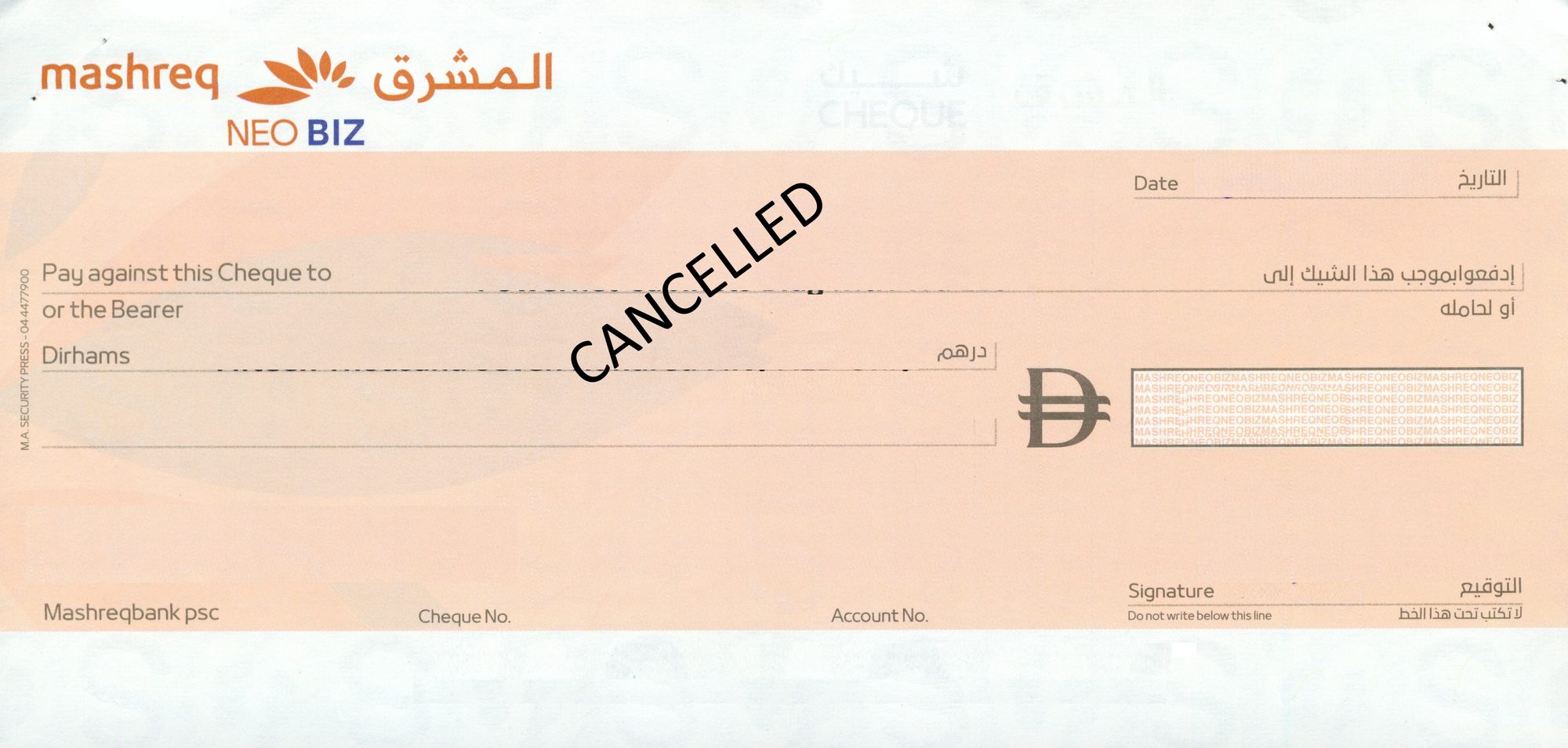
Mashreq has the widest spread of cheque sizes of any bank in our library. Three measured books, and the smallest is barely three-quarters the width of the largest.
Three Mashreq books, three different sizes
This is the one bank where guessing costs you a cheque leaf. A Neo Biz book can arrive at full wide format or at the short 160 mm format, and those are not variations of the same setting — they are different sizes of paper.
| Cheque book | Code in the software | Measured size | What to watch |
|---|---|---|---|
| MASHREQ NEO BIZ BIG | MAS-003 | 206 × 99 mm | Full wide format. The one we see most often. |
| MASHREQ NEO BIZ SMALL | MASHREQ-001 | 205 × 100 mm | Called small, but near-identical in size to the big book. Named for the book, not the leaf. |
| MASHREQ NEO BIZZ SMALL-2 | MASHREQ-002 | 160 × 73 mm | Genuinely short format. Forty-six millimetres narrower than the others. |
Note the trap in the naming: the book Mashreq labels small measures 205 mm, almost the same as the big one. The one that is actually short is the second small variant at 160 mm. The code is reliable where the name is not, which is why the library prints codes on every card.
Feeding a 160 mm cheque through a laser printer
The short Neo Biz leaf is where most Mashreq setups go wrong, and it is a paper-handling problem rather than a software one. At 160 × 73 mm it is close to an envelope in size, so the tray guides have to be brought in to hold it straight. A leaf that goes in skewed prints skewed no matter how good the layout is.
- Use the manual or multipurpose tray, not the main paper cassette.
- Bring the side guides in until they touch the cheque without bowing it.
- Feed one leaf at a time. Short stock is the kind that two-sheets.
- Set the paper size to a custom size rather than A4, so the printer does not try to centre the text on an A4 page.
Do your first run on a photocopy of the cheque. You will see immediately whether the sheet is being pulled square.
The four fields and nothing else
Date, payee, amount in words, amount in figures. The software only prints the text fields, so your Mashreq stationery — the bank mark, the account details, the magnetic band — is untouched. Across all three Mashreq books the amount in words is set to wrap to a second line when the figure is long, which on the 160 mm leaf happens sooner than you would expect.
Questions we get asked
My Neo Biz cheque says small but it is 205 mm wide. Which do I pick?
Pick MASHREQ NEO BIZ-SMALL - MASHREQ-001. The name refers to the cheque book, not to the size of the leaf. Only the SMALL-2 variant is physically short, at 160 mm. Measure the width of a single leaf and let that decide.
Will one Mashreq setting cover all three books?
No, and that is the point of keeping them separate. The 160 mm leaf is forty-six millimetres narrower than the other two, so the amount in figures would print off the edge of the paper. Select the book you are holding.
Can I print Mashreq post-dated cheques as a batch?
Yes. Enter the payee and amount once, set the first date and the interval, and the series prints with the dates advanced. For rent cheques where the start date lands awkwardly, the PDC date calculator gives you the dates first.
Check your cheque against the library first
Open the UAE bank cheque library, find the code printed on your cheque, and pick the same name in the software. If your book is not there yet, send us a scan through a ticket and we measure it.
Download the Windows trialSet up Mashreq cheque printing today
AED 950 all-in — hardware, software, installation, training
💬 WhatsApp Us Now